1. Introduction
In this article, I will share the process of setting up CI/CD (Continuous Integration/Continuous Deployment) for my personal blog. Automating the testing and deployment process helps me save time, minimize manual errors, and maintain the quality of the blog consistently.
If you’re managing a small blog or website, this could be an easily applicable CI/CD solution.
1.1 Benefits of Automated CI/CD Deployment
Time-saving: Updates and deployments are handled automatically.
Error reduction: Each update is tested before being deployed.
Scalability: Adding features or making changes is as simple as updating the source code.
1.2 Tools Used
GitLab CI/CD: Manages and automates the source code pipeline.
VPS and Nginx: A server (I use Ubuntu) to host the blog and configure Nginx as the web server.
Docker (optional): Packages the application into containers for easier deployment and management.
2. CI/CD Setup Process
Configuring the Pipeline on GitLab CI
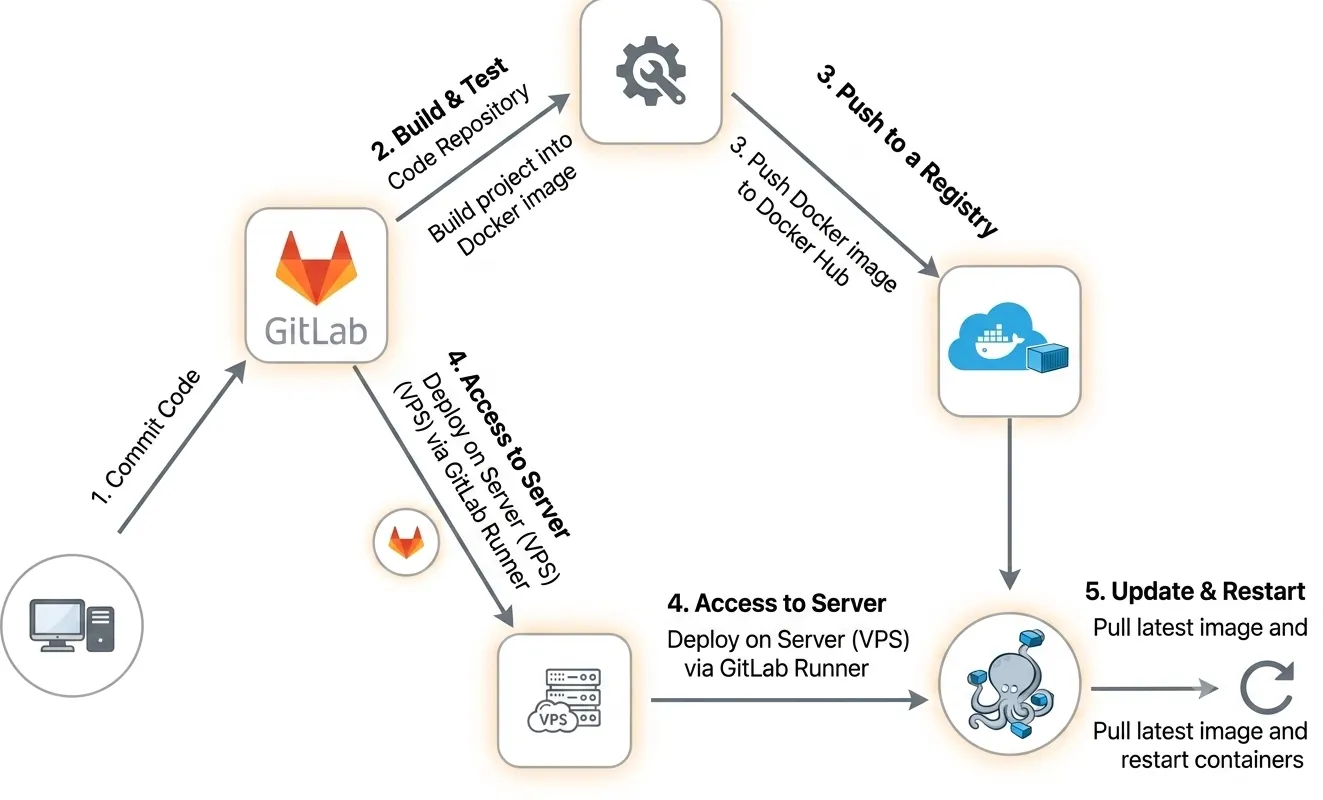
I created a .gitlab-ci.yml file in my repository to set up the CI/CD pipeline. This file includes the following:
Build stage: Packages the project into a Docker container and pushes it to Docker Hub
Package the project into a Docker image.
Push the image to Docker Hub.
  build:
      stage: build
      image: docker:25.0.3
      services:
        - docker:25.0.3-dind

      before_script:
        - echo "$CI_REGISTRY_PASS" | docker login -u "$CI_REGISTRY_USER" --password-stdin
        - echo "ENV_VARABLE=$ENV_VARABLE" >> .env

      script:
        - echo "Start building source code..."
        - docker build -t $REGISTRY/$IMAGE_NAME:$IMAGE_TAG . # build docker image
        - docker push $REGISTRY/$IMAGE_NAME:$IMAGE_TAG # push docker image lên docker hub
        - echo "Complete build source code..."
Deploy Stage: Pulling the Container from Docker Hub and Running it with Docker Compose
Access the server using GitLab Runner.
Stop the currently running Docker container.
Pull the new Docker image from Docker Hub.
Start the new Docker container.
    deploy:
      stage: deploy
      needs: [build]
      before_script:
        - echo "$CI_REGISTRY_PASS" | docker login -u "$CI_REGISTRY_USER" --password-stdin
      script:
        - echo "Start deploy source code..."
        - cd <project path>
        - docker compose stop interface $ALIAS dừng container đang chạy
        - docker compose rm -f $ALIAS # xoá image liên quan
        - docker compose pull $ALIAS # pull image từ docker hub
        - docker compose up -d $ALIAS # chạy container
        - echo "End deploy source code..."
      only:
        - main
      tags:
        - <project runner tag name>
Conclusion
With this CI/CD setup, I can quickly update the blog with a single push to the repository.
Each change is automatically tested and deployed, allowing me to maintain a stable blog with minimal effort.
Setting up CI/CD for a personal blog is a small step that brings long-term benefits. It not only optimizes the workflow but also provides an opportunity to learn and apply DevOps tools in practice.
I hope this article will be helpful for you as you implement CI/CD in your own projects!